This is a test post from 
Tuesday, June 15, 2010
Monday, July 6, 2009
Wednesday, July 1, 2009
Blog moving
I'm going to be moving this to a self hosted wordpress blog, and merge in my old etsy feedback and have a online store in it as well as my Artfire Store. Never hurts to get MORE out there.
Been wanting to move off this anyway. So if you come back and it's not here, wait a bit and try again.
this will be happening over a week or so, I don't have time to do it really, but itchy to get into code again so making some time.
the old blog will stay at verybigjen.blogspot.com with a pointer to the new site I'm moving SchmaltzyCraftsy.com to when done and all these posts here will be there... clear as mud?


Monday, June 29, 2009
Off of Etsy
Etsy has decided to shut my store down.
After 224 (100%) feedback, and 334 sales, I'm shut down. I can't even have an account now, even to buy. They are turned me off on Tuesday completely but I had a chance to save off my customer data.
Reason? Good Question. They cited "user complaints", but won't elaborate further. Since I can't use the forums or Storque so I'm not sure what they can find to complain about me with, other than I work for Artfire and exist.
I cant say I'm surprised. I've been expecting this since September when I joined on at Artfire and announced it here on my blog, so this is just the other shoe dropping. I've more or less stayed on out of pure spite.
You can of course find me on Artfire for all your pincushiony needs.
Labels:
etsy,
pincushion,
verybigjen
Friday, May 1, 2009
Crafting your image on Flickr
Flickr.com is the biggest photo sharing sites in the world. Its size is precisely why you want to join and start sharing pictures.
You can go anytime and see amazing photos from every corner of the world. I’ve made it a part of every day. I’ve addicted family members to it. Media and publisher’s go to it to find images. I got a craft book deal thanks to Flickr! You can make friends, find fans, and be discovered. But you also see other people’s stuff and learn new ways to do things and take pictures. It’s awesome. It has a totally different vibe than most other social sites.
But remember, Flickr is about people who like to take and share photos - not people who want to get spammed into the netherworld to buy your things. Don’t just join and start sending your pics everywhere, have something interesting to contribute. This guide I hope will help you learn how to best use it and be a good “Flickrite” and not an obnoxious desperate promoting maniac no one want to look at.
I use it for all kinds of things, and it's a great way to promote your store and art as well as share your life.
There are also site rules and “site culture” to be aware of, and I’ll try to get to all of it in this article as much as I can, Flickr is very powerful and multifaceted, but fair warning: It’s also addictive.
Setting up Your Account
If you have a yahoo account you are already 9/10ths done to getting your Flickr account set up, Yahoo owns Flickr now.
After making an account the first thing you want to do is head over to the blue “You” menu and go down to “Your Account” to start setting up some preferences as you how your page looks and who can do what with your photos.

The personal Information tab has quite a bit in the way of choices for you to set up. be sure to look through them all.
Look through all the tabs, We’re going to tackle these one by one:
Personal Information:

This is your basic account functions. Here you can set your avatar, Screen name, your Flickr web address, fill out your profile (more on this later), edit your Yahoo login info, and delete your account.
Screen names can be changed at any time I suggest using the username you are most known by, or your real name for either or both.
IMPORTANT! Be sure to set your Flickr Web Address!
When you sign up you have a user number in your URL to reach your pictures, like http://www.flickr.com/photos/83186333@N00, unless you are a memory superhero you will never remember this. You want an easier to remember URL to give out to people. You can choose anything as your URL to reach your pictures, but you CANNOT change it once set, so pick something you want long term - like your name or usual username you use online or on your stores (I use verybigjen on everything) instead of a URL with a impossible to remember numeric user number in it.
http://www.flickr.com/verybigjen/ is so much nicer than http://www.flickr.com/photos/83186333@N00 isn’t it?
Privacy and Permissions:

This section has many settings to set for your own wishes and I won’t advise you other than to make these suggestions:
Allow anyone blog your photos, this will add a “blog this” button to all your pictures and could result in someone blogging you easier. Remember, this is photo SHARING - not photo keeping.
I suggest that on the issue of who is allowed to download and print your photos that you set it to at least “You and your friends and family” so when and if you add personal photos (which you can also set separately to “friends and family” only to keep them more private) your relatives and buddies can print them out easily.
I also suggest you let anyone make notes, they are a fun way to draw attention to or comment on a specific element of a page (see the notes section later on for info on what these are).
Email:
Here you can change your email, set up notifications on your recent activity, but this page also has a couple select personal-to-you addresses for you to add to your camera phone or wherever else you wish so that you can email direct to your flickr account! You can even instantly blog something via email!

Extending Flickr:
This is where you can add or delete blogs that you can blog to from within Flickr, set up your Facebook account, and where a list of Flickr tools sites you’ve issued permissions (if any) to access your pictures for various things. You likely won’t have anything listed there if just starting out.

Uploading and Sharing
Flickr has many many ways to get found and be seen. Photos can be searched for by tags from the top search, but the Explore page offers many ways as well. You can search by most popular tags, location, even camera model! These are the most common methods of discovering photos along with seeing them in groups.
Uploading your pics
Once you have your account set up you want to start uploading! Flickr has many ways to do this.
They have an Upload Page on the “You” spot on the menu, but I recommend heading to Tools and seeing the various OTHER ways you can upload your pictures, like from your camera phone via email! The web uploader can even select entire folders of pictures!
But while there, be sure to grab a copy of the Uploadr for your system and use that. It’s a little stand alone application that makes it so easy to upload images. You can drag and drop big groups of pictures right into it, arrange the order, fill out titles and descriptions, and add tags all right there as well as automatically add them to a set. It’s very swift.
Once you get them up you might want to go into the Organizr to add them to any sets, make new sets, add tags to the batch, etc (see the section on the Organizr) or start adding them to groups!
Groups: The secret power of Flickr
Go to the Flickr Groups Page. This is the best way to get seen on Flickr. There are possibly millions of groups to join and even be invited into on Flickr. These are usually themed to a topic, such as colors, style of photos, or photo content. There are thousands and thousands of crafting groups on Flickr. Sometimes there are multiples for even the most obscure thing.

I make pincushions and look how many pincushion groups there are! That’s just PINCUSHIONS! If you do pottery, sewing, fiber arts there are even more!
But if there are many to choose, which groups are the best to join to get seen?
I advise joining the largest ones that directly apply to what you do. You can filter results by “group size” so start there, look at each group before joining, see if you really like it. Larger groups have more people in them, but they don’t always have the most views so don’t choose the 13,000 member group over the 600 member group when the smaller one might be more active and give you more eyes on your pictures.
Also make sure the groups have rules you can apply. Some moderate entry, some moderate how many pictures you can add at one time or in a time period or have in the group total. If that doesn’t match your needs and desires, if might not be the group for you.
How to add your pics to a Group:
You can add a picture, or group of pictures to groups from within the Organizr, or from each photo’s page. Either way you do it there will be a “Send to group” button above the picture or pictures and this will pop up any groups you belong to. Just click a group and it’ll send it! For more about groups see the Getting Seen section below.


Another way to add pictures to groups is directly from the group page. There is a new link there called "Add Photos or Video" just click that and it makes it pretty easy to add at least your newest pictures from the group itself, if you are a member that is. You won't see this link otherwise.
Free Vs Pro Accounts
Flickr has two kinds of accounts: Free and Pro. Free is just that, free. But there are some limitations.
Flickr Pro is an incredible deal, and worth every cent. Flickr Pro is the best deal out there for storing photos. bar none. I have my own domain and server space and I removed my photo gallery for Flickr, I couldn't host my own for the price of a Pro account.
Free: $0
• 100 MB monthly upload limit (10MB per photo)
• Only latest 200 pictures are viewable (you can have more, but only the latest 200 can be accessed. If you go pro, the hidden pictures will be available which is nice if you lapse.)
• Photostream views limited to the 200 most recent images
• Post any of your photos in up to 10 group pools
• Only smaller (resized) images accessible (though the originals are saved in case you upgrade later)
• NEW: Unlimited sets to organize your picturess in
• Ads.
Pro: $24 year
• Unlimited pictures and storage. No limits on how many picturess you can upload (size limit for each photo raised to 20 mb max - that's a HUGE photo)
• Unlimited sets and collections (this is worth it alone)
• ad-free (I never noticed how many ads there were till I logged in on an alternate free account once... wow lots of ads.)
• Post picturess in up to 60 group pools
• Stats on your photos (awesome, I've found so many referals to my stuff, this gives you a way to follow up and leave comments and thank folks for the linkage)
• Ability to replace a photo (more useful that you'd think if you want to swap a better version and not lose all your comments, or have two of the same thing up)
• Upload short video clips (most cameras now shoot 60-90 second video clips, Flickr calls them 'long pictures.' this more of a fun thing, but it's still cool)
• Archiving of high-resolution original images: this is more significant than you first think. When you have a free account you can't access any "original" size photos you upload, they are there, but you can't get to them, so using Flickr as a backup is largely difficult. But being pro means you have a offsite backup, and after I suffered TWO hard drive fails in two months and lost EVERYTHING locally, it really saved me.
• Alternative layout templates for your account homepage. They have a few different options (multiple columns, sidebar with your choice of collections or sets listing, etc). So you have some options to say what you want people to see when they arrive at your top page. Big pictures? Small pictures? Sets or collections, or neither? Your choice.
• No ads.As a Pro user I've found it totally worth the $24 a year. You won't find a better list of offerings, or a nicer group of folks. Google charges much more for less on Picasa. And other sites don't have the cache of Flickr. It's simply the best deal around.
I even buy Pro accounts for my friends and family for birthdays and they all consider it as fabulous as I do.
Terms You need to know
Contacts?
People who make you a contact simply like your pictures. They might want to see more, or they just want to know when you add more. You get notification when they add new pictures. Most of my hits come from my contacts. These are the people you want most of all as they are your customers and fans. Comment on their pictures too when you can.
You can make them contacts too if you want, but the list of YOUR contacts can get long really fast and when you get notices on who has added pictures so often you can find yourself looking at junk you don't know or care about. I know many will say “friend everyone who friends you” but I only add people I truly want to see more of. Life is too short, you know?
You can make contacts friends and/or family as well, to allow them special access to any sets you’ve made that aren’t public to everyone. Use these sparingly, save them for the real things.
Notes?
Notes are a way to outline an area of a picture to draw attention to it, identifying people in a picture, or comment on an element of it. When someone rolls over the picture it will show the shapes to then rollover to show the notes. Some people like notes, some don’t. You can choose in your Promissions tab in your account screen who can or can’t leave notes. I let everyone, if I get one I don’t like I just remove it. It will say who left the note, so readers can tell if you left it (yellow note) or someone else did (green note, with name and link to person’s Flickrstream).
Here is a sample of notes on a picture (roll over the picture, then the shapes you see).
- Here's one of mine, you can see my comments and other people commenting on them!
Flickrstream?
This is the name of a user’s Flickr pages, since they always display chronologically by newest. Also called a Photostream.
Interestingness - Is that a word?
On Flickr it is. Views, comments, and the number of times people mark it as a favorite all roll into a picture’s “interstingness” and get it possibly “Explored."
Explored?
The DO's and DON'TsThe level of its “interestingness” can elevate it into seriously major exposure on the Explore - last Seven days Page (see above) where the best a brightest of Flickr appear and you can get thousands of views and hundreds of comments in not much time. It’s the best of the best, but it’s also not an easy thing to achieve, however so don’t go stressing out, about it 95% of Flickrites will never be “Explored” even once. It’s not juried, it’s all picked automatically according to something called the “algorithm.”
The one constant to making it to Explore is that you have really excellent pictures, but even then many excellent pictures never make it. As with anything with a “formula” you can manipulate a little by NOT overexposing your pictures. I know it’s oxymoron, let me explain.
You can use groups to get your pictures seen, but put your pictures into too many groups and you LOWER your chances to make it on Explore, if not completely remove it from the running. It’s like averaging. If you keep the amount of groups you submit your pictures to under 10, you don’t hurt yourself in the algorithm and still can get it out there, but the algorithm is being tweaked constantly so don’t stress. It’s a bragging right, that’s all. You can get even more views just from your contacts and NEVER make it into Explore. It’s just a bonus prize in the game of Flickr! It’s rush when you get it, but don’t go hoping for it.
For even more on this click here. They explain it all far better than I do and can also tell you when you’ve made it to Explore!
Flickr is a community. As with any there are rules and traditions and people shucking them aren’t appreciated. Luckily these are pretty simple and sensible.
DO’s
Do post more than craft picturess
Flickr is a great site, but its better when you use it as a part of your life, not as a tool to make money. Share those childhood pictures, back up your photos on Flickr, store the photos of your life there, make it part of you.Do join groups
Groups are a major way to get seen by people, be it crating or not. Editors, craft publishers as well as buyers are known to find groups on what they are interested in. (I got my book deal due to being prolific in a themed craft group and sharing my pictures and tutorials.) You can join a group add your pictures and unjoin, but aim more to find groups you will consistently add to, and be a member. You can also have your pictures invited to groups in the comments, sometimes with a button to click that you won’t even have to join to add them. If invited, add it!Do comment on other’s pictures
You like to get comments, so does everyone! Don’t be quiet, be friendly even if it’s to say “WOW that is cool!” or "That's an amazing picture."Do chime in on group discussions
Share yourself, and your knowledge. Start a thread, answer a question, give some help. Some groups have fun photo games in discussion threads like eye spy, etc, which can be very addicting.Do go to Explore and look at what is there
Just for inspiration. You will see some of the most wonderful pictures in the world, and maybe get some ideas. Nothing bad about that.Do be a part of the Flickr community
Enjoy it. Participate. Learn it. Live it. It’s a lot more fun when you start to connect.Do put every picture into a set
Orphan photos are sad. Even if you have to have one set called “everything else” this is still going to help people see all your pictures. There are also some handy backup services that will let you download your originals from Flickr so you can back them up to disk, but they only do it by the set. It also makes it easier to sort through them if you have them in some kind of set (Note: you can only download originals if you are a pro user).Do tag every single picture
People can't find you if they aren't tagged. Not only does it help others find you, it helps you find your own pictures. You can tag by batches in the Organizr or you can tag as you upload in the Uploadr.Do add new pictures of the duplicate items
Some of your followers may not have seen when you first posted that item, if you are redoing your pictures and you took a nice one of a duplicate, set it up! People will look.
DON’Ts:
VERY VERY IMPORTANT!! Don’t put any of your online store URLs in your photo descriptions!
This is expressly against the Flickr TOS and they have yanked accounts and cleared thousands of pictures off the face of the earth for violating them. They (usually) warn you (not always though), and the rules are quite easy to adhere to, but if you ignore any warnings they will remove your account. It’s well documented. However, You ARE allowed to have ONE URL to a blog or store in your profile. I send people to my blog, which has buttons and shop windows to my ArtFire studio.Don’t expect views to just happen
Just putting them online doesn’t mean people will see them. You need to bring the hits to you by using groups and commenting. Putting pictures on your blog from Flickr and linking back will help too.Don’t add your pictures to groups that don’t apply.
Don’t drown a non-craft group in craft pictures, keep your pictures applicable to the groups you add them to.Don’t send your pics to TOO MANY groups.
Don’t add too many pictures to a group at once, people really dislike seeing more than 20 or someone’s pictures in a chunk. Keep it under 10 (even if you can post more) to not look like a “group hog” and lessen your chances to get better exposure in Explore (see the ‘Terms to Know’ section above). Let some other people get their chance on the first page of the group too!Don’t just join all the biggest groups and just bomb them with your pictures endlessly.
If they want to see more of your pictures they’ll go to your “Flickrstream”, or better yet your profile, which is what you REALLY want.If you have any doubts if you are playing by the rules you can contact Flickr and ask for a review (or re-review) of your account and pictures to make sure you are adhering to the rules. They’ll come back and tell you if you are in violation and offer suggestions.
Organizing and Editing:
The Organizr:
This is a very powerful little application. It allows you to search visually within sets, drag and drop them in to “batches” to make new sets or add other sets, add pictures groups, and add tags. You can even move the date you “uploaded” it if you want it to appear earlier in your stream.It’s all drag and drop and I think very straight forward. I encourage you to just poke around and if you need help, read this Flickr Guide on the Organizr. They do a great job of explaining everything.
Picnik:
Picnik is a separate site that has teamed with Flickr to bring it editing tools. Above each picture you will see a “edit” button, that will take you over to a Picnik interface and you can start doing all kinds of fun things like color correction, cropping, effects, even adding text and graphics like hearts and stuff. Its super simple to use and you even have the option to save the image or save it as a new image leaving your original untouched. You can have a lot of fun in there!
Fun stuff:
Flickr has tools! Lots and lots of tools. And Lots. But there are even more sites that offer add-ons to Flickr. Make mosaics, make badges, all kinds of cool things. Here are some of my personal favorites:
http://flickrslidr.com/ - allows you to easily embed the classic Flickr slideshows on your website or blog.http://picmarkr.com/ - lets you to add custom watermark (image or text) to your images online for free.
http://bighugelabs.com/flickr/ - all kinds of fun things to do with your pictures, games, toys, make mosaics, add goofy titles... just a site full of fun.
Here is a BIG list of sites that work with your pictures on Flickr, it’s really an endless supply of cool things to play with.
There is so much on the web with toys and tools for flickr, that I won’t even start to explain them all, it's all out there. If you have a wish, just look for it, I bet someone made it already and has it up for grabs.Greasemonkey:
It makes it seem like you have your own express backstage pass on Flickr with essential shortcut functions that you forget aren't standard when you use someone else's computer (I'll do another article soon on Flickr scripts that are a MUST HAVE).
Once you get to be a hardcore flickr user, and use Firefox, you will want to start getting on the Greasemonkey bandwagon. Greasemonkey is an add on to Firefox that allows to your run scripts to make your web life easier. A greasemonkey script is a simple javascript that adds functionality to a specific webpage. There are hundreds and hundreds of scripts for Flickr and installing them is as easy as clinking the link then the install button that appears.
Licensing and Creative Commons
Creative Commons:
This is a web recognized self-assigned licensing method. YOU say how your pictures may or may not be used. This is entirely up to you; there are a few kinds of licenses to choose from I’ll recommend you go to the settings page and learn more. Or you can go to the Creative Commons Website for some detailed descriptions of the various licenses.Basically there are licenses for everything from “You can use it if you credit me” up to something akin to “keep your hands off my stuff!”
Flickr has a search for finding pictures in the various Creative Commons categories and I know many publishers and magazines will do these to find pictures. My mother’s own pictures have been used on Wikipedia many times for various things, as well as having photos she took of her hometown purchased to use in a chain restaurant!
If you are unsure what License is best for you, here is a handy wizard: http://creativecommons.org/license/
Remember though, putting your pictures online, even with this licensing, exposes them to possible theft. While you can turn off who can get to your full size originals, who can blog, print, even comment on you pictures, you can never protect against screenshots.
In your account settings you can set a default choice for your license, but you can readjust this on batches of pictures in Organizr or individually from the more info section on the far right bottom of your photo page.

Conclusion:
Flickr is a great place for your pictures, you can gain a great many good things from it including new friends! But try to be a good community member. Be yourself, share your life, your process, and your work, don’t spam. Enjoy it! It will widen your horizons and show you the most wonderful sights you’ve ever seen.
Labels:
flickr
Sunday, April 12, 2009
Need a place to shoot product pics?
Try your car! I shot these pics of my necklace while waiting for the hubby to get out of the store, on the dashboard of my van. A perfect light filed environment with a BIG overhead window, heat, AC and stereo! Add some cloth or props and I bet you get some nice shots!
Here's the ones I took, click the pic to see the whole set!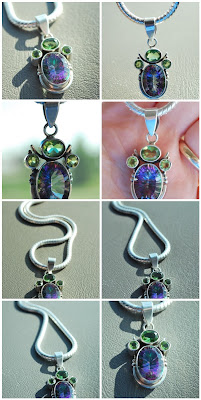
Friday, April 10, 2009
I do not think this word means what you think it means...
Once are active in the "handmade" community you will notice that some terms are thrown about without care for their actual meanings, if they truly know them at all. This irritates me greatly.
Here's a few bugging me currently from Etsy:
"Indie": This is one of the many terms Etsy has been helpful in misappropriating from the music scene for the crafting corner. Let me say this clearly as I can: Craftig has always BEEN "indie" aka independent.
Indiemusic is a usually unsigned band producing it's own records their way without intervention of "the man" while being independent of a label or a small tiny label that isn't attached to a "big" label who helps bands make albums. It's use in crafting it just irritating as you can't be "indie" if there is no "major league". Crafting has always BEEN indie. There has never been commercial crafting. It's always been some woman (usually) in a corner making dolls, quilts or something. Sure there are quitling club but htey aren't sponsored by Penzoil or if you get my drift. And before you say it, I don't count Martha Stewart - unless you work for her.
Another term that they have taken out of context is "street team": Again it comes from music industry. A street team is a band of band fans, usually unpaid led by a compensated head usually, that you use with promises of tickets and schwag to get the word out *on the street* of your bands and concerts by plastering wall with posters, talking it up etc. Basically paying them in cheap comps to be your marketing slave.
In Etsy-land you do all the talking and promo and you get nothing back, least of all support from the staff or even acknowledgment of your efforts. It has even less of a reward than the marketing music weenies give. Rip off if you ask me.
My next irritation is Etsy's move to "merchandising" it's site. And it's most astounding thing to me yet.
They sell it as a way to enhance thier "themes" but what they are actually trying to get sellers to make items to fit *Etsy'* ideal product line that fits what *they* like. This has been a move they have been making increasingly since hiring some "retail guru" to help them develops an "Etsy brand" look and feel, except that 90% of the sellers on the site do not apply to their personal asethetics. (horsies, poppies, stamped silver discs, owls, mustaches, recycled books, cowls, mustard yellow, beige, grey, fingerless gloves, white porcelain... it goes on and on... but its obvious to see if you just watch the front page a few days as to what they like.)
What they fail to get is that Etsy is not a retailer with vendors they can request to provide a line of items with aesthetics to mesh with your current product line. They are not Target, or Crate & barrel! Etsy has yet to realize they not only do not HAVE a product line, but at it's ONLY "product" is the listing service they sell the sellers who are their real and ONLY customers.
The truth is that Etsy is the vendor. A vendor that needs to fill the needs required of it's customers and frankly, they aren't doing it. (TOOLS? Where? Repect? Ha!) Instead they are asking its customers, all crafters of every concentration, to adapt their products to look to their obvious and shallow list of likes with the promise of promo if they do. That is well, frankly, the opposite of art. And they don't even GET that.
They are dictating a 'look' that 99% of the sellers cannot compete with since Etsy has all but proven that their personal tastes outrank whatever you might be selling, and if you don't apply to it you have no chance in hell of being supported/promoted/given a fair shake with the dozens of opportunites they freely give to those few that DO fit.
And that sucks. A whole lot.
Whew , glad I got that off my chest.
Thursday, March 5, 2009
Flickr: Free Vs Pro
In talking about Flickr today I realized that not many folks really know how AWESOME Flickr Pro is and how much it's worth it.
I wrote this up as small part of a yet unpublished Guide on Flickr for Artfire:
Free Vs Pro acocunts
Flickr has two kinds of accounts: Free and Pro. Free is just that, free. But there are some limitations.
Free: $0
• 100 MB monthly upload limit (10MB per photo)
• Only latest 200 pictures are viewable (you can have more, but only the latest 200 can be accessed. If you go pro, the hidden pictures will be available which is nice if you lapse.)
• 3 sets
• Photostream views limited to the 200 most recent images only
• Post any of your photos in up to 10 group pools
• Only smaller (resized) images accessible (though the originals are saved in case you upgrade later)
• NEW: Unlimited sets (formerly was limited to three)
• Ads.
Flickr pro is an incredible deal, and worth every cent. Flickr pro is the best deal out there for storing photos. bar none. I have my own domain and server space and I removed my photo gallery for flickr, I couldn't host my own for the price of a Pro account.
Pro: $25 year
• Unlimited pictures and storage. No limits on how many pics you can upload (size limit for each photo raised to 20 mb max - thats a HUGE photo)
• Unlimited sets and you get Collections (this is worth it alone) which you can put sets into.
• ad-free (I never noticed how many ads there were till I logged in on an alternater free account once... wow lots of ads.)
• Post pics in up to 60 group pools.
• Stats on your photos (awesome, I've found so many refs to my stuff, this gives you a way to follow up and leave comments and thank folks for the linkage)
• Ability to replace a photo (more useful that you'd think if you want to swap a better version and not lose all your comments)
• Upload short video clips (most cameras now shoot 60-90 second vid clips, flickr calls them 'long pictures'. this more of a fun thing, but it's still cool)
• Archiving of high-resolution original images : this is more signifigant than you first think. When you have a free account you can't access any "orginal" size photos you upload, they are there you can't get to them so using flickr as a back up is largely difficult. But being pro means you have a offsite backup, and after I suffered TWO hard drive fails in two months and lost EVERYTHING locally it saved my butt.
• Alternative layout templates for your account homepage. They have a few different options (1 column, 2, 3, sidebar with your choice of collections or sets listing). So you have some options to say what you want peopel to see when they arrive at your top page. Big pics? Small pics? Sets or collections, or neither? Your choice.
• No ads.
As a pro user 've found it totally worth the $24 a year. You won't find a better list of offerings, or a nicer group of folks. Google charges much more for less on Picasa.
I even buy pro accounts for my friends and family for birthdays and they all consider it as fabulous as I do.

Friday, February 20, 2009
Small Japanese Cherry Blossom Pincushion

I had a custom order for smaller version of my large 7" cherry Blossom Pincushion. I am very pleased with the results!
This is the same size as my Girly Tomatos and pumpkins. 3.5" or so wide, and is my only design that I have in threes sizes. (I have it as a bottlecap too!)

Saturday, February 14, 2009
My pincushions on TV, kinda...
Fast Forward to 1:32 for a mention of the Pretty Little Pincushions book and yours truly... cool! She has it written up on her blog here as well.
Tuesday, February 10, 2009
Kunin Felt and the CPSIA
I got this today, and in light of all the CPSIA confusion I knew my fellow synthetic felt crafters would want to know:
Dear Kunin Customer,
Kunin a division of Foss Manufacturing Company, LLC would like to address recent concerns regarding the latest set of CPSIA laws that have affected many of our customers. Attached you will find a letter from our President Michael DeGrace stating that our products meet the recent requirements as stated by the CPSIA. We are not required to certify our product as it meets the standards set forth by the CPSIA.
Our products are produced in Hampton NH and we have checked and verified that all of our raw materials meet the current requirements and that they are safe. We would like to reassure our customers that we are providing products that are of high quality and meet all safety regulations in accordance with the law.
If you should have questions regarding the laws and our textile products I have attached for your convienence the document called "Guidance on the Consumer Product Safety Improvement Act (CPSIA) for Small Businesses, Resellers, Crafters and Charities" this should answer most of your questions. You may also visit the following link for more information regarding the requirements. www.cpsc.gov/ABOUT/Cpsia/cpsia.HTML
If you still have further questions feel free to contact me so I can further assist you.
Best Regards,
George Stellmach
National Sales & Marketing Manager
Kunin Group / A Division of Foss Manufacturing Company, LLC
direct line: 603-929-6118 cell: 603-661-6040"

Wednesday, February 4, 2009
Paddle Punches on the cheap!

Maybe not the whole selection but they are $1 to $2 each direct from the manufacturer, Sizzix in thier Outlet store on ebay. That's a bargain considering what I bought some for a couple years ago, and for something that is discontinued! (and believe me no one is mourning that fact more than me!)
That's also cheaper than you will find from other sellers on ebay or Etsy sellers.

They are so essential to my work I bought $40 worth a few times or several shapes I use all the time just to have duplicates of duplicates for the future when they are no longer available. I have so many now I have to stop looking at the site due to the urge to buy more - just in case! I think I have more than I will ever ever need.
So load up, while you can! I did god knows!
Here is a list of shapes as I know them, in no particular order:
1. BALLOON
2. STAR
3. STAR #2
4. PARTY HAT
5. POSEY
6. TEDDY BEAR
7. HAND
8. HEART #1
9. HEART #2
10. TROPICAL FISH
11. SUN
12. FOOT
13. MOON
14. TREE, PALM
15. STAR, PRIMITIVE #1
16. STAR, PRIMITIVE #2
17. HEART, PRIMITIVE #2
18. HEART, PRIMITIVE #1
19. Diamond
20. Oval
21. Water Splat
22. Buckle Maker
23. Button Hole #1
24. Button Hole #2
25. Circle #1 (3/4”)
26. Circle #2 (1/4”)
27. Circle #3 (1/2”)
28. Dragonfly
29. Leaf
30. Holly Leaf
31. Oak Leaf
32. Square #1
33. Square #2
34. Square #3
35. Rectangle
36. Funky Square
37. Wavy Square
38. Triangle
39. Two buttonholes
40. Four buttonholes
41. Boy paper doll
42. Girl paper doll
43. Dog
44. Cat
45. Swirl
46. Butterfly
47. Bat
48. Bookplate
49. PUMPKIN
50. BOW
51. Ice Cream Cone
52. Duck
53. Ghost
54. Frog
55. CAR
56. MUSIC NOTE
57. Postage Stamp
58. snowflake
59. snowman
60. Christmas tree
Friday, January 30, 2009
The Call

MSLO = Martha Stewart Living Omnimedia
The Martha Stewart Show called!
Sent in some more info, and will mail out some bottlecaps on Monday... hoping to get a yay or nay in the next couple weeks.
Squeeee!
They were following up on an email I sent them a couple months ago when they were looking for reuse/recycle crafts.
Wish me luck, it's merely 50/50 from here.
Sunday, January 25, 2009

Wednesday, November 19, 2008
Felt crafters rejoice!
If you have seen my work (or my flickr sets) you might have noticed I have ALOT of felt colors that most people have never seen. It helps to leave near a dozen craft stores. (Helps more to have an in with the felt co who will send me what I can't find locally in exchange for sending them projects and pieces to use on the site and at shows - hehehe)
Anyway - After teaching a class at a local quilting club, I was talking to some friends who own a sewing supply company that does mail order about how they carried some of the Kunin Rainbow felt line of cut 9x12 squares, but it was they didn't have them all. I said that only one place i could find carried all the colors and they only sold 24 packs and charged a ton for shipping.
My friends called me back today, they decided to carry them all 45 shades, the ENTIRE line, and even reduced shipping for felt orders since they don't weigh anything! SO if you were holding of ordering online because all there was was massive quantities, now you can go nuts!
They sell two dozen colors in 24 sheet (min) packs, but have the ENTIRE line, all 45 Kunin brand colors in 12 sheet (min) half-packs, including the new 2008 colors. The minimum on the entire line is 12 sheets per color, so you can load up but not get to much in all those colors you can't get! And shipping is $6!
They are great people and are taking a chance on this, since they heard my mention of people looking for it.
They are called SANE, and tell them I sent you! (I do not get a thing from it, other than not looking like a idiot for talking them into ordering a bunch of felt. They'd just like to know who told who.)
Here is the jump straight to the felt section: http://tinyurl.com/feltsquares
Tuesday, November 18, 2008
A deal you can't beat

These guys are the next etsy. I'm working there as the designer, so everything you see has my fingers all over it. Tons of tools already and more coming, so many you won't believe.
The $7 deal is only for 5000 registrations so get over there now.
Wednesday, September 3, 2008
Why I hate magnetic pin "cushions"
All things aside about them being as attractive as an ashtray, there's a reason I don't use magnetic pincushions anymore. They're dangerous.
Several years ago I was sewing at the machine and got up to try on a piece in progress and in my way back to sit down my garment caught a pin in the magnetic cushion and CRASH!
Pins all over the carpet. Under the table too. So I bent over and picked up a section then got on my knees and started scooping them off the carpet and under the table.
When it looked all clear I pivoted on my knees to get a good handhold to get up and OW!
Something stuck me in the top of the foot. I had a tiny red dot on the skin, and I found a pin nearby so I figured I'd just been stuck.
The next day, my foot was a little tender on top, but nothing out of the ordinary I thought since it was punctured by a pin where it was. While at work I was increasingly in more and more pain as the day went on. My foot was swelling up inside my shoe to the point it was incredibly painful. I started the tough 1.5 hour drive home. I called for a friend a neighbor to come drive me over to the hospital and we promptly arrived at the ER with me crying from pain (I'm not a cryer). We managed to get my shoe off, and the pain was a tiny bit better, but my foot looked awful. Like a bloated sausage.
They xrayed it. You could clearly see the shape of HALF a straight pin lodged horizontally in the flesh of the top of my foot on the films. It had broken off inside. Great.
They set my up in a corner of the triage and after a half hour in comes this giant machine. It had a Horsehoe type section, and what it seemed to be was a live xray imager with a computer screen. The "viewing" part was a horseshoe shaped attachment about 3 foot wide. They sat my foot in the center of the thing and gave me a couple numbing shots. (And took some pictures with the machine for me, which I would include but I can't find them at this time)
It was like a video game version of the old board game Operation. They could see the pin live inside my foot, but they didn't have a good angle on it, just one side. They were poking tools into my foot blind basically. The pin was hidden deep in flesh of my foot. Little by little they had to increase the incision to try to get at it. Occasionally they'd bump it and I'd wince or moan as it hurt! You could see the pliers coming close to it and when it was close you would see the pin move. The problem was all they could get at was the snapped off end, a virtual dot in a small opening of blood and fatty tissue. It was small and slippery, so the pliers kept loosing it.
Finally, two hours of poking and missing and a two sided incision later they finally managed to get a pair of pliers on it and gave a stiff tug. It came free. It had stuck into one of the metatarsal bones in my foot, which is why it was so hard to remove, and probably why it snapped off.
Most of my pain lessened immediately. I actually walked into the car which was something not easily done on arrival. Took three days for the swelling to go down, but they have poked and prodded in there so much I have a small bulge of scar tissue there now and a V shaped scar 10 years later.
This is why I stuff my pincushions so firmly that they actually sound as if they crunch when you poke a pin in them. I stuff in so much polyfil that I almost can't put in even a little more... I want to make sure that if you drop it, the pins stay in! Because I know what can happen if they don't.
I don't use magnetics anymore either. Not only do I not miss it, I don't stick my fingers trying to get a pin like I used to.
Sometimes the old way is the best way.

Friday, August 29, 2008
Get yer Bottlecaps!

I drink the pop so you don't have to! (okay I have help... friends collect them for me)
I am now selling them in my Etsy store in batches of 10, 50 and 100 so if you need some, come on over!
Monday, July 7, 2008
The Essentials.
I'm often asked questions regarding what I use to make my pincushions with, particularly how I cut such fine shapes. So I thought I'd do a post on my short list of tools and materials I use.
I'm blessed in my location I have four Hobby Lobbies, a plethora of Joann's (including a Joann Superstore) and a myriad of Micheals, as well as a few other chains, and count them TWO needlework stores within 40 miles of my house. A simple 15 minutes in any direction will have me in a craft store, sometimes more than two. I know not everyone is so lucky, but online stores are your friend for most of this. I buy my stuff in a combination of in stores and online. With gas prices anymore, it's cheaper to pay for shipping versus driving for it.
I use a discontinued scrapbooking product by Sizzix called a Paddle Punch. You can really on find them on ebay anymore as well as craiglist. And if you can get them for $2 or less a piece before shipping, that's a deal considering they sold for $6 each in stores.
Find them on ebay with this link - some weeks have more than others. I have a search set up there to mail me when new ones are listed.
One of the best stores to get them at on ebay is the Sizzix Outlet, they sell a great number of paddle punches, including the cutting mats. Paddles are available for $1 and they also have bulk lots as well. BEST DEAL ON EBAY.
There are over 50 patterns that were made, but all are small, most under 1.5 inches. There are a few kinds of leaves, with Holy and Oak being the two hardest to find, as well a couple kinds of flowers, and lots of geometrics. Also some specialty shapes that I'll never likely use but I bought them in case I ever needed them. I recommend getting any you might want remotely want in duplicate, as in time these won't be available anymore. I have some of my most used ones in triplicate. And if the handle breaks off one, I don't throw it away, it goes into my "last resort" box.
There is a "paddle punch hammer" but truth is since I am using them for felt, I by pas it for a "lady hammer" or a picture hammer, with a bottlecap taped over the head to not mar the punch. I also use a 16 oz rubber mallet from a hardware store. Both can be under $4 each. Which one you use depends on the shape, I find some work better with one or the other, so I have both.
To use them I stack 4 to 5 layers of felt, on top of two sheets of paper (good use for junk mail, old magazines, or even scrap printer paper) on top of the Sizzix punch matt. It Is a extremely heavy matt and I do recommend them, they do hold up more than normal cutting mats I used before hand. Basically just try the hammers out till you find the ones that works best, some will need several hits around the edges, others can do just one swift solid thud to the center. You'll just have to figure out what each ones needs. You'll learn soon enough.
Other tools I use:
- Variety of scissors: Shears for cutting & and sharp tipped ones for fine details and embroidery
- Thread snippers - very useful for more than thread. I use them to also trim small corners and cut circles into "flowers" and take out stitches.
- Doll needles are essential to put in the buttons on thick pincushions. I have quite a collection. some from as long as some super heavy 8 inches long all the way down to 4". When I found the 8" ones it was the fleamarket and I squealed in joy, they are really hard to find. Dritz makes a nice thinner 5" model available most everywhere, it has the bonus that it will also go through most buttonholes. Unlike my thick 8 inchers that can also kill a man.
- 100% post consumer recycled synthetic felt from Kunin. Joann's carries this brand, but most stores have a very limited selection, you need to go to Createorless.com (search for "kunin felt"), they have the entire line - but you can only get 24 sheets of a color minimum. So use it for the colors you need a lot of or what you can't ind locally, or sell the rest!
I use Pearl/Perle cotton size 5 for the embroidery and construction. I also use Craft Thread, which is a cheaper version, but comes in bulk pack, and its nice for starting off with and then widening out to Pearl #5. I don't like using Embroidery Floss, it's not strong enough and the skeins while cheap are not very long. There are 27 yards in a skein of Pearl cotton. I have a DMC thread guide (thank you Micheals 50% off coupon) and I order any colors I can't get at craft stores from Herrschers or at a local needlepoint store.
- Just ordinary polyfil for the inside.
- I get my fabric sticky labels that I "sign" my work with from Camillesquilts on etsy. Take a look! They stick FABULOUS on felt!

Hope this was useful for you, let me know if you have any further questions!
Subscribe to:
Posts (Atom)
 | Kunin Felt
All content and photos are copyright Jen Segrest